CoderCaster/HyperRoll

HyperRoll

Every HyperDeck in the building. One window.

Group, arm and roll your Blackmagic HyperDecks from a layout that looks like the remote you already know — with frame-accurate countdowns, playlists, in/out points and a Stream Deck API. Up to 16 decks, over plain Ethernet.

Windows 10+ & macOS 11+ Offline activation Sold direct by the developer
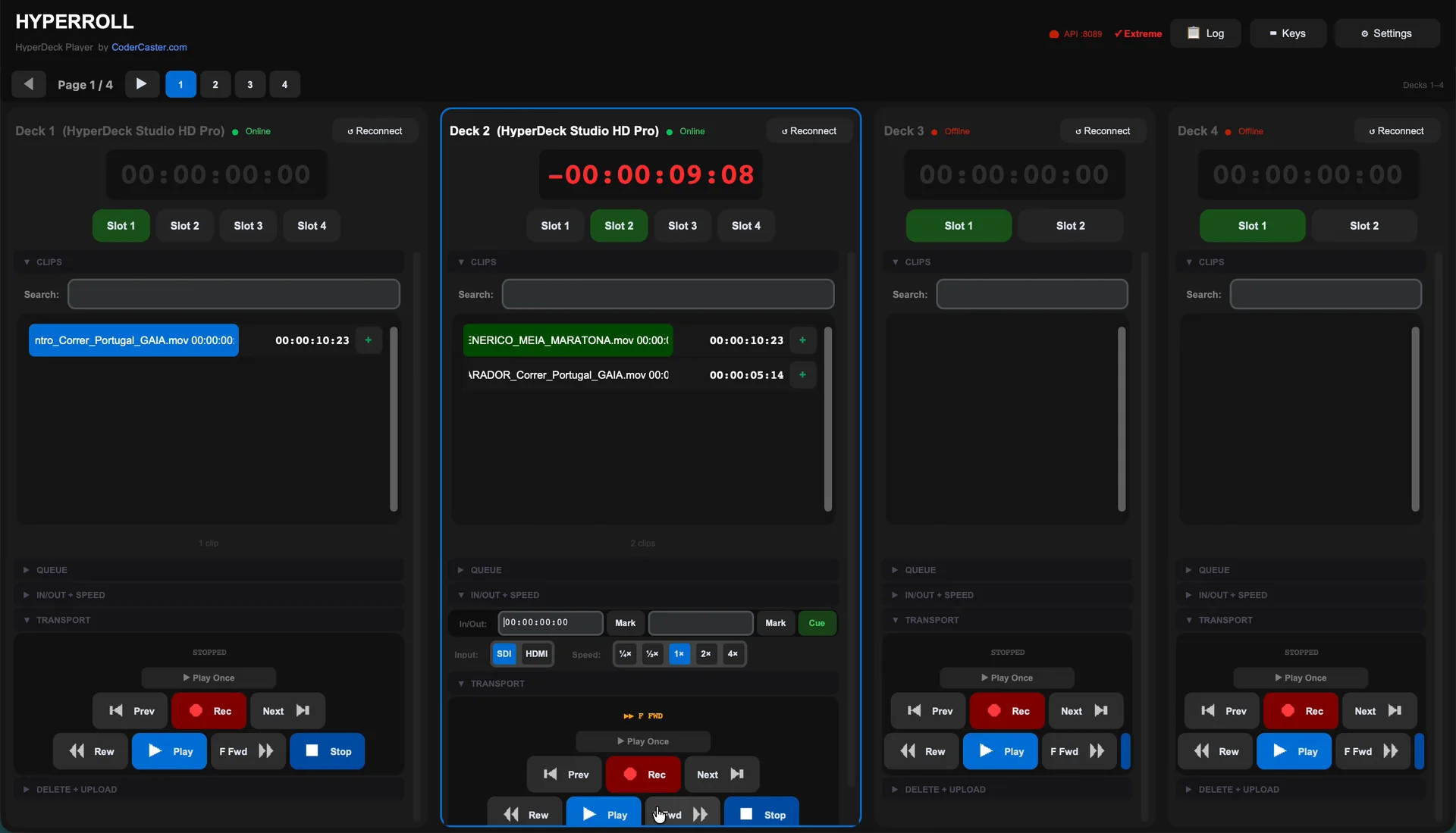
HyperRollFour decks · deck 2 playing
HyperRoll controlling four HyperDecks, deck 2 playing with a red countdown
01 — What it does

Built by someone who runs HyperDecks under pressure.

Every button sits where an operator expects it. Nothing to learn, nothing extra in the rack.

01Zero learning curveThe transport layout mirrors the hardware panel. Operators are productive in minutes, not days.
02Group, arm, roll — togetherTrigger multiple decks at once, in sync, from the keyboard or a Stream Deck. Works minimised during the show.
03A countdown you can read across the roomFrame-accurate remaining time on every deck, turning red as the clip runs out.
04Playlists & in/out pointsQueue clips with auto-advance, mark in and out points, and play from ¼× to 4× speed.
05Drag, drop, it's on the deckDrop a file on a deck and it uploads over FTP, with progress and an automatic clip-list refresh.
06No extra boxes in the rackPlain Ethernet to the decks. No dongles, no converters, nothing to install on the decks.
02 — Editions

Pick your deck count.

Four editions, from a single deck to sixteen. You buy directly from the developer — tell us the edition and how many workstations, and you'll get a quote.

Decks1 / 16
Lite
1 HyperDeck
  • Full transport controls
  • Clip list with search
  • FTP drag-and-drop upload
  • Live timecode countdown
  • Resume playback
  • Delete clips remotely
  • Auto-detect HyperDeck model
  • Play modes (Loop Clip / All)
  • StreamDeck HTTP API
  • Playlist queue
  • In/Out points
  • Speed control
Request a quote
Most popular
Decks2 / 16
Base
2 HyperDecks
  • Everything in Lite
  • Control 2 decks simultaneously
  • Play modes — Once, Loop, Loop All
  • StreamDeck HTTP API
  • Works minimised — perfect for live
  • ATEM-style transport detection
  • Playlist queue + auto-advance
  • In/Out point editing
  • Variable speed playback
  • Input select (SDI/HDMI)
Request a quote
Decks6 / 16
Pro
Up to 6 HyperDecks
  • Everything in Base
  • Control up to 6 decks at once
  • Playlist queue with auto-advance
  • In/Out point editing + cue
  • Variable speed (¼× to 4×)
  • Input select (SDI / HDMI)
  • Queue control via HTTP API
  • Built for sports, events, broadcast
Request a quote
Decks16 / 16
Extreme
Up to 16 HyperDecks
  • Everything in Pro
  • Control up to 16 decks at once
  • Paged view — 4 decks per page
  • Page navigation bar + Ctrl shortcuts
  • F1–F16 deck switching
  • All Pro features included
  • Built for large-scale broadcast
Request a quote
One licence per workstationNot sure which edition? The 7-day trial is full-featuredMulti-station and facility quotes available
03 — Compatibility

Works with the decks you already own.

Supported HyperDecks

  • HyperDeck Studio HD Mini
  • HyperDeck Studio HD Plus
  • HyperDeck Studio HD Pro
  • HyperDeck Studio 4K Pro
  • HyperDeck Shuttle HD
  • HyperDeck Extreme 4K & 8K HDR

What you need

  • Windows 10 or later, or macOS 11 or later
  • The computer and decks on the same Ethernet network
  • No internet connection — activation is offline
  • Optional: an Elgato Stream Deck for hardware buttons
  • One licence per workstation
04 — FAQ

Questions before you roll.

Which HyperDeck models does HyperRoll work with?

HyperDeck Studio HD Mini, HD Plus and HD Pro, Studio 4K Pro, Shuttle HD, and HyperDeck Extreme 4K and 8K HDR. HyperRoll detects the model automatically when it connects.

Do I need extra hardware?

No. HyperRoll talks to the decks over your existing Ethernet network. A Mac or Windows computer on the same LAN is all you need.

Does HyperRoll need an internet connection?

No. Activation is offline and deck control stays on your local network, so HyperRoll runs in air-gapped facilities.

Which edition do I need?

It depends on how many decks you control at once: Lite for one, Base for two, Pro for up to six and Extreme for up to sixteen with paged views. The 7-day trial is full-featured, so you can test before deciding.

Can I control HyperRoll from a Stream Deck?

Yes. Base and above include an HTTP API that a Stream Deck or any automation system can call. Pro and Extreme add queue control over the same API.

How do I buy a licence?

Directly from the developer. Send a message with the edition and number of workstations and you'll get a quote. Multi-station and facility quotes are available.

Is HyperRoll made by Blackmagic Design?

No. HyperRoll is independent software by CoderCaster and is not affiliated with or endorsed by Blackmagic Design.

05 — Free trial

Try it on your own decks first.

Seven days, every feature unlocked, on your real network. No credit card. Enter a work email and the download unlocks right here.

7-day trial

Test grouping, playlists, countdowns and Stream Deck control with the decks you already have.

✓ Unlocked. Pick your platform:

Download for Windows Download for Mac

WINDOWS 10+ · MACOS 11+

06 — Contact & quotes

Talk to the person who wrote it.

Quotes, custom layouts, integrations, multi-station licensing, or a question about your specific decks — you'll get an answer from the developer, not a ticket queue.

Quotes for HyperRoll and CGRoll — single or multi-workstation
Enterprise licensing for BMS and News
Early access to modules in development
Compatibility questions before you buy

Your details are only used to reply to you. Privacy policy

✓ Sent. A confirmation is on its way to your inbox.